 Sunset Mesa Software
Rewire Text
Transform selected text anywhere, with a keystroke.
Rewire Text lives in your menu bar and system tray. Select text in any app, press a hotkey, pick a transform, and your text is replaced in place. Fast on-device transforms for everyday text, plus AI rewrites when you want them.
What is Rewire Text?
It is a system-wide text utility for macOS and Windows. It sits in your menu bar or system tray and waits for a global hotkey. The defaults are Cmd+Shift+, on macOS and Ctrl+Shift+, on Windows, and you can change them to whatever you like.
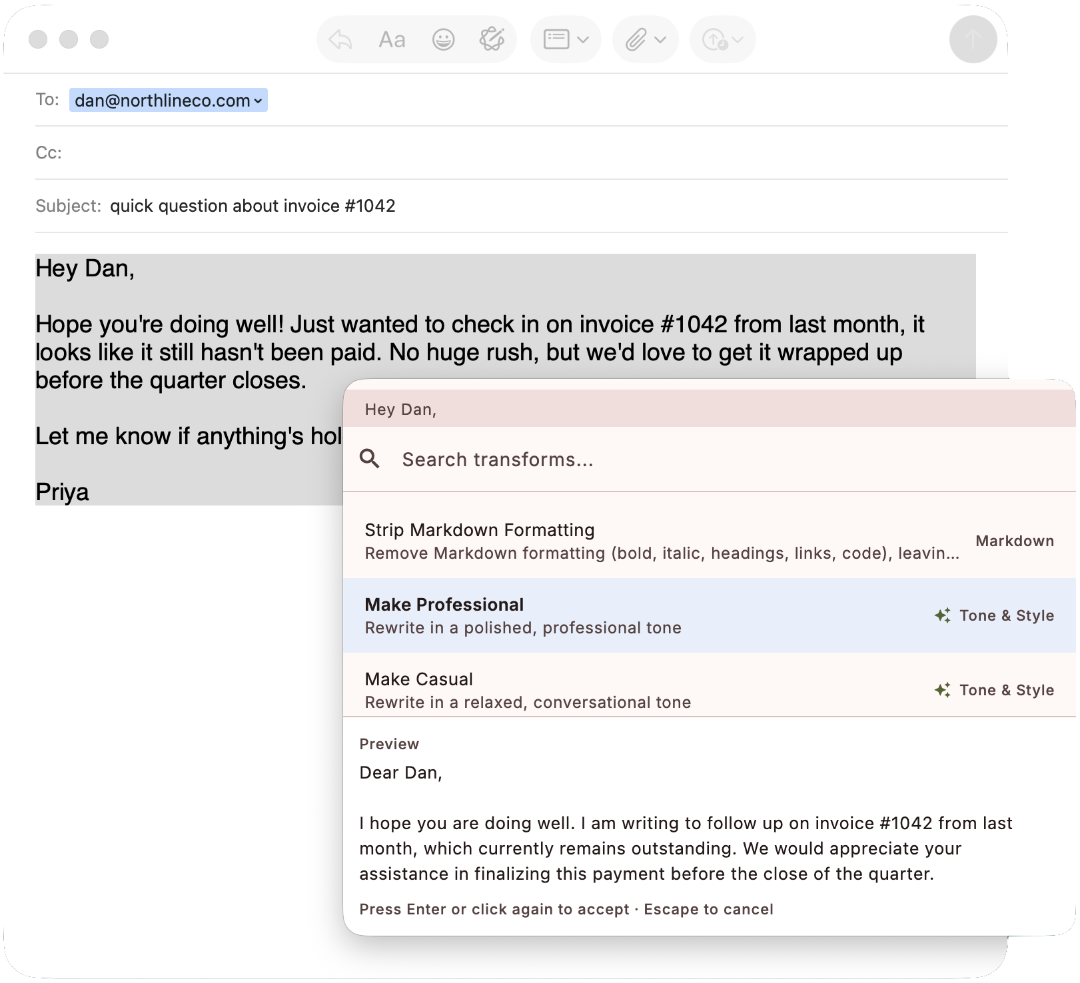
There are two ways to use it. Most of the time you select text in another app, a browser, your editor, an email, a chat window, then press the hotkey. A command palette appears, you pick a transform, and the selected text is replaced right where it sits. It works the same in every app, so you stop copying text into a separate tool and back again. The transforms you run all day can skip the picking step too: give any transform its own hotkey and it runs on your selection the moment you press it.
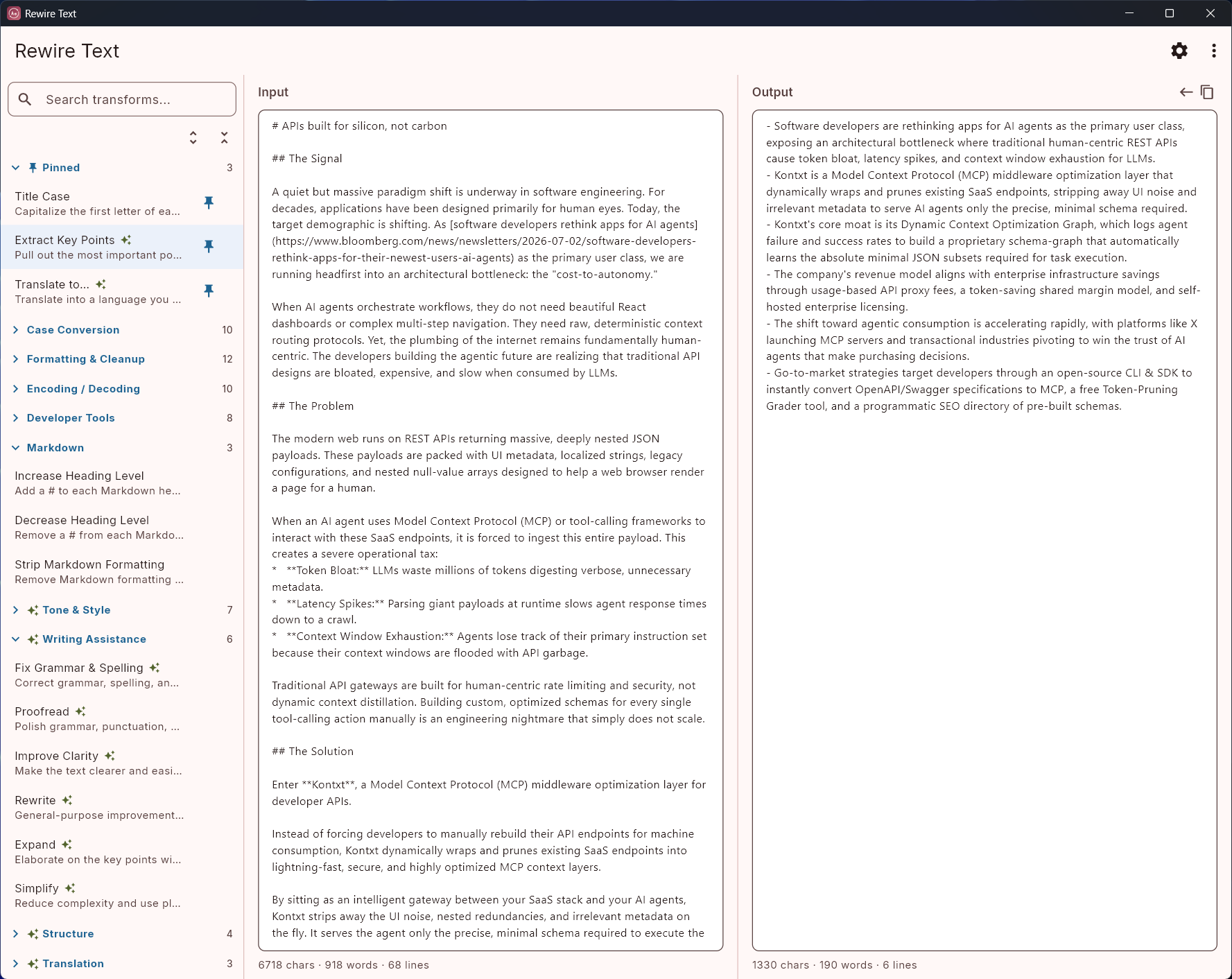
When you'd rather work in one place, open the full app window. Type or paste your text, run a transform, and see the result next to it. The window is also where you pin the transforms you use most, so they stay one click away.
 Read the getting-started guide →
What you'll actually use it for
A few of the things that stop being a chore once the transform is one keystroke away.
Fix the tone of an email before you send it
In your mail client, select the draft and run Proofread or Make Professional. The cleaned-up version replaces what you wrote, without switching to a chatbot and pasting it back.
See the workflow →Summarize or rewrite notes in Obsidian or Notion
Select a messy paragraph, run Summarize or Rewrite, and keep working in the same note. The result streams in where the text already was.
See the workflow →Translate text inline, without a browser tab
Select text in any app and translate it in place. Add the languages you use as one-click transforms, or type any language on the spot.
See the workflow →Fix text that came in the wrong case
Paste a heading that arrived in ALL CAPS and set it to Title Case. Tone down a sentence someone typed in all caps. Your editor probably can't do this. Rewire Text can, in any app: email, Slack, Notion, a CMS.
See the workflow →Shift Markdown headings when you merge docs
You pasted a section into a larger document and every heading is one level too shallow. Increase or decrease every heading at once. Almost nothing else fixes this inline.
See the workflow →Clean up messy text
Strip Markdown formatting down to plain text. Flatten hard line breaks copied from a PDF or email into one clean paragraph. Collapse the extra blank lines.
See the workflow →Two kinds of transforms, one tool
The deterministic half makes the app useful the moment you install it. The AI half is there when a task needs judgment, not just a rule.
Deterministic transforms
Instant. On-device. No API key. Included.
These run the moment you install, with no setup and nothing sent over the network. Case conversion, Markdown heading shifting, strip-to-plain-text, whitespace and line-break cleanup, encoding, JSON formatting, and more. The set keeps growing.
See the full listAI transforms
Bring your own key, or run a model locally.
Summarize, rewrite, change tone, proofread, expand, simplify, and translate into 29+ languages. Results stream in as they are generated. The AI transforms need a provider key or a local model.
How the AI works50+ built-in transforms, plus translation into 29+ languages and unlimited custom transforms you save and reuse.
See all transforms
Deterministic
Case
UPPERCASE, lowercase, Title Case, Sentence case, camelCase, PascalCase, snake_case, kebab-case, CONSTANT_CASE, Slugify
Markdown
Increase Heading Level, Decrease Heading Level, Strip Markdown Formatting
Formatting & cleanup
Trim Whitespace, Remove Blank Lines, Sort Lines A–Z, Sort Lines Z–A, Remove Extra Spaces, Normalize Line Endings, Strip HTML Tags, Unwrap Text, Deduplicate Lines, Add Line Numbers, Remove Line Numbers, Reverse Text
Encoding & decoding
Base64 Encode/Decode, URL Encode/Decode, HTML Entity Encode/Decode, JSON String Escape/Unescape, Unicode Escape/Unescape
Developer tools
JSON Format, JSON Minify, Count Characters / Words / Lines, Generate Lorem Ipsum, Extract URLs, Extract Emails, CSV → JSON, JSON → CSV
AI (bring your own key)
Tone & style
Make Professional, Make Casual, Make Friendly, Make Concise, Make Formal, Make Persuasive, Humanize
Writing assistance
Fix Grammar & Spelling, Proofread, Improve Clarity, Rewrite, Expand, Simplify
Structure
Summarize, Convert to Bullet Points, Extract Key Points, Create Outline
Translation
One-click Translate to any language you add (29+ in the catalog), plus ad-hoc translate to anything you type
Custom
Custom Instruction (a free-form prompt), plus custom transforms you name once and reuse
Using the AI transforms
The deterministic transforms work the moment you install, with zero setup. The AI transforms are bring-your-own-key. You connect an account you already have, or make a free one, and Rewire Text uses it directly. There is no Sunset Mesa Software subscription and no markup on top of your usage.
It works with Google Gemini, Anthropic Claude, OpenAI, xAI Grok, and OpenRouter, plus any other OpenAI-compatible endpoint. Or run a model fully locally with Ollama, LM Studio, or llama.cpp, so nothing leaves your machine.
You don't have to pay to try the AI features. A free Google AI Studio key, or a free model on OpenRouter, is enough to get going. The setup guide walks through it.
Your text goes straight to the provider you choose, never through our servers. We have no account system and we don't collect your text. Deterministic transforms and local models never touch the network at all. Your keys are stored in your operating system's keychain.
 See the AI setup guide →
Pricing
One purchase, no subscription. Use it on any two devices and manage them yourself, so your Mac laptop and your Windows desktop can share a single license.
- ✓ The full deterministic catalog
- ✓ All AI transforms, with your own key
- ✓ Pin your most-used transforms, or give them their own hotkeys
- ✓ Free updates within the version you buy
- ✓ macOS and Windows
Try everything free for 7 days. After that, a core set of transforms stays free for as long as you want, and the one-time purchase turns the full set and AI back on, on both your devices. You own what you buy: it works forever, with no kill switch, no forced upgrades, and no recurring fees.
macOS and Windows. On Windows, also on the Microsoft Store.
Where else to find Rewire Text


Questions
Do I need an AI subscription to use this?
No. The deterministic transforms are included and run offline. The AI transforms use your own provider key, so you pay the provider directly, usually pennies, with no markup from us.
How is this different from using ChatGPT in a browser?
No copying back and forth, and no separate tab. You transform text where it already is, in any app, using your own key.
Do I really own it?
Yes. One purchase, no subscription, no kill switch, no recurring fees.
How many devices can I install on?
Two, on one license. Put it on your Mac and your Windows PC, or your home and work machines, and move the license between machines yourself when you need to.
What happens after the free trial?
You get 7 days with everything working. After that, a core set of transforms stays free for as long as you want, and buying once turns the full set and AI back on.
How does Rewire Text stack up against apps like RewriteBar, Grammarly, or PopClip?
We keep honest side-by-side comparisons: platforms, pricing models, deterministic and AI transforms, and who should pick what. Several of those tools are good at their job, and the pages say so. See how it compares.
Can you add a transform I need?
Maybe. We are happy to consider it. Email us with what you have in mind (the link is below) and we will take a look.
Have another question? Get in touch.
Get updates about Rewire Text
An email when a major new version ships, plus the occasional update from Sunset Mesa Software. No spam, and you can leave any time.
Try it on your own text
Download the free trial and use everything for 7 days, or buy it once for $29.