 Sunset Mesa Software
Fix the tone of an email before you send it
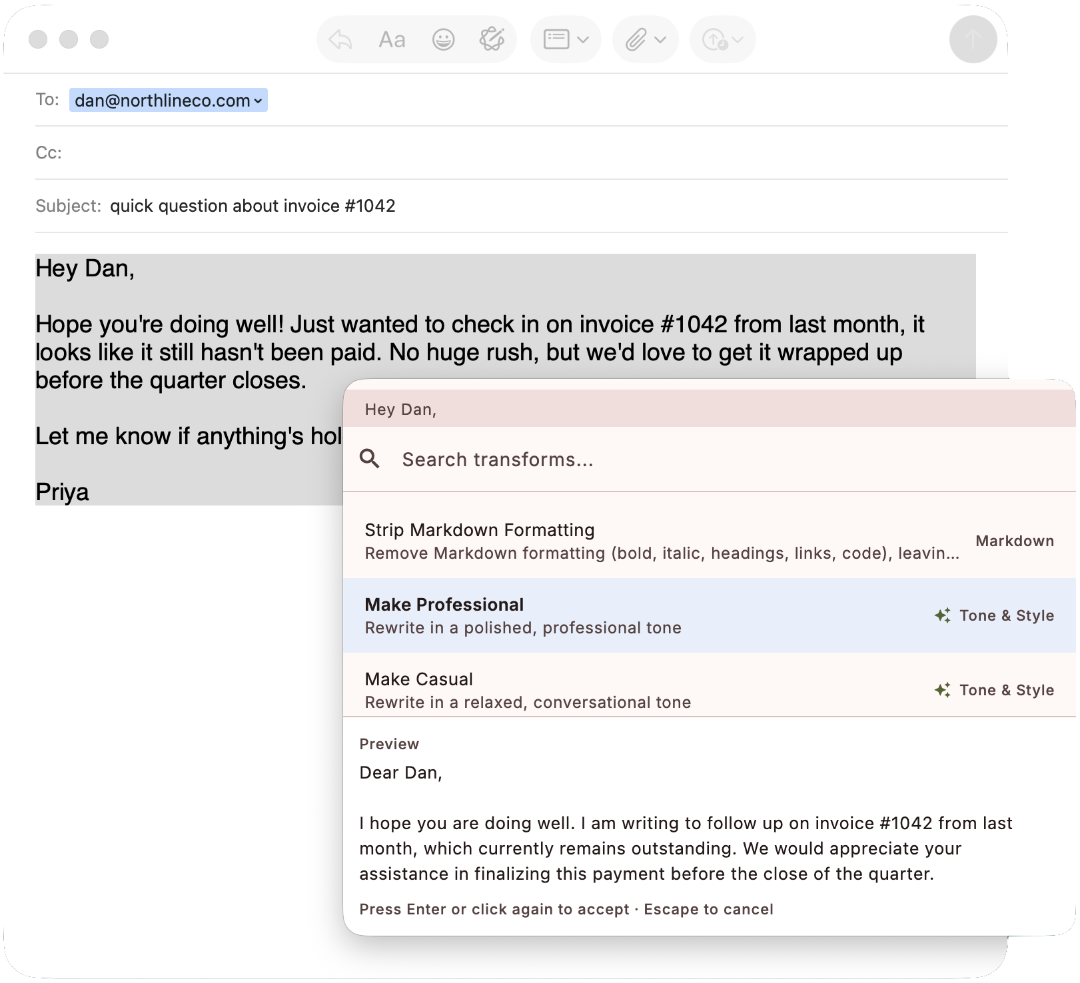
Write the email the way it comes out, then fix it in place. Select the draft in your mail client, press the hotkey, and run Make Professional, Make Friendly, Proofread, or Make Concise. The rewrite streams into a preview, and one keypress replaces the draft right in the compose window. No chatbot tab, no pasting your email into a website, and it works in every mail app the same way.
From blunt draft to sendable email
The first version of an email is for you: fast, casual, maybe a little too direct. The version you send is for the recipient. Getting from one to the other used to mean rewriting by hand or the ChatGPT round trip. Now it is: select the body, press Cmd+Shift+, (macOS) or Ctrl+Shift+, (Windows), type "prof", Enter. And if Make Professional earns a spot in your routine, give it its own hotkey in Settings › Hotkeys: then the rewrite is already streaming into the preview the moment you press it.
Before
Hey Dan,

Hope you're doing well! Just wanted to check in on invoice #1042 from last month, it looks like it still hasn't been paid. No huge rush, but we'd love to get it wrapped up before the quarter closes.

Let me know if anything's holding it up or if you need me to resend it. Thanks a bunch!

Priya
After
Hi Dan,

I hope you're well. I'm following up on invoice #1042 from last month, which appears to be outstanding. There's no urgency, but we'd appreciate settling it before the end of the quarter.

Please let me know if anything is holding it up or if you'd like me to resend it. Thank you.

Priya
Pick the register, not just "better"
Tone is a menu, not a single button. Make Professional for the invoice chase above. Make Friendly to warm up a message that reads colder than you meant it:
Before
No. That deadline was agreed three weeks ago and we are not moving it.
After
I hear you, but we locked that deadline in three weeks ago and I would really rather not move it now. Happy to talk through what is blocking you and see what we can do on our side.
Make Concise trims a rambling update before it goes to an executive. Make Formal suits legal and official correspondence. And when the wording is fine but the typos are not, Fix Grammar & Spelling corrects the mechanics and leaves your voice alone.
Transforms for this workflow
- Make Professional
- Make Friendly
- Make Concise
- Make Formal
- Proofread
- Fix Grammar & Spelling
Part of 50+ built-in transforms. See the full list
Questions
Which email apps does it work with?
Any of them: Apple Mail, Outlook, Thunderbird, and webmail like Gmail or Fastmail in the browser. Rewire Text acts on the selected text, so it does not care which compose window it is in.
Does my draft get sent anywhere?
Only the text you select, only when you run an AI transform, and only to the provider you configured. Nothing passes through Sunset Mesa servers. With a local model, the draft never leaves your machine at all.
Can it fix typos without changing my voice?
Yes. Fix Grammar & Spelling makes minimal corrections only. The tone transforms (Make Professional, Make Friendly, and the rest) are the ones that rewrite the voice, and you pick which job you want each time.
Will the rewritten email still sound like me?
It starts from your draft, so your points, structure, and details survive; the transform adjusts register, not content. Review the preview before accepting, and if a rewrite drifts too formal, Make Casual and Make Friendly pull it back.
What does each rewrite cost?
You pay your own provider per use, with no markup: for an email-sized rewrite on a light model, a fraction of a cent. Free options (a Google AI Studio key, a free OpenRouter model, or a local model) work too.
Try it on your own text
Download Rewire Text and use everything free for 7 days. Buy it once for $29 and it runs on any two of your devices, macOS or Windows.